- Why Khata Billing POS Software Transforms Daily Operations for Indian Small Businesses
- Understanding Khata Billing Free Plan Limits for GST Invoice Management
- How to Set Up Your First POS Screen with Khata Billing's Intuitive Dashboard
- Khata Billing POS Software Feature Comparison: Free vs Premium Plan Capabilities
- Practical POS Workflow Example: Managing 15 Daily Invoices with Real Numbers
- Step-by-Step Guide to Creating GST-Compliant Invoices with Barcode Integration
- Maximizing Business Growth with Khata Billing's POS and Inventory Synergy
- Frequently Asked Questions
Khata Billing POS Software provides GST-compliant invoice generation and point of sale management for Indian small businesses, with free plan limits of 10 invoices per day and 100 per 30 days, while Premium offers unlimited invoicing and GST-ready reports for ₹1,499/year (₹999/year with code SAVE500). The software includes barcode-based invoicing, POS with up to 20 screens, and POS inventory tracking for daily operations. Its free plan supports 1 bank account, 1 cash account, and basic dashboard widgets, with premium features adding unlimited accounts, advanced reporting, and watermark-free invoices.
✅ Key Takeaways
- Khata Billing POS Software handles GST invoicing up to 100 per month in the free plan and unlimited with Premium
Why Khata Billing POS Software Transforms Daily Operations for Indian Small Businesses
Khata Billing — free GST billing software transforms daily operations for Indian shopkeepers and retailers by replacing manual paper billing with GST-compliant digital invoicing and real-time inventory tracking, eliminating calculation errors and speeding up checkout.
With Khata Billing, a small kirana store owner can generate a GST invoice in seconds using barcode-based entry, while simultaneously reducing stock levels in the central inventory as items are sold, ensuring accurate stock valuation without daily manual counts. The POS interface supports up to two billing screens, allowing cash and card payments to be recorded instantly, and auto-syncs data across mobile and desktop devices so the shopkeeper sees current stock levels and pending invoices in real time.
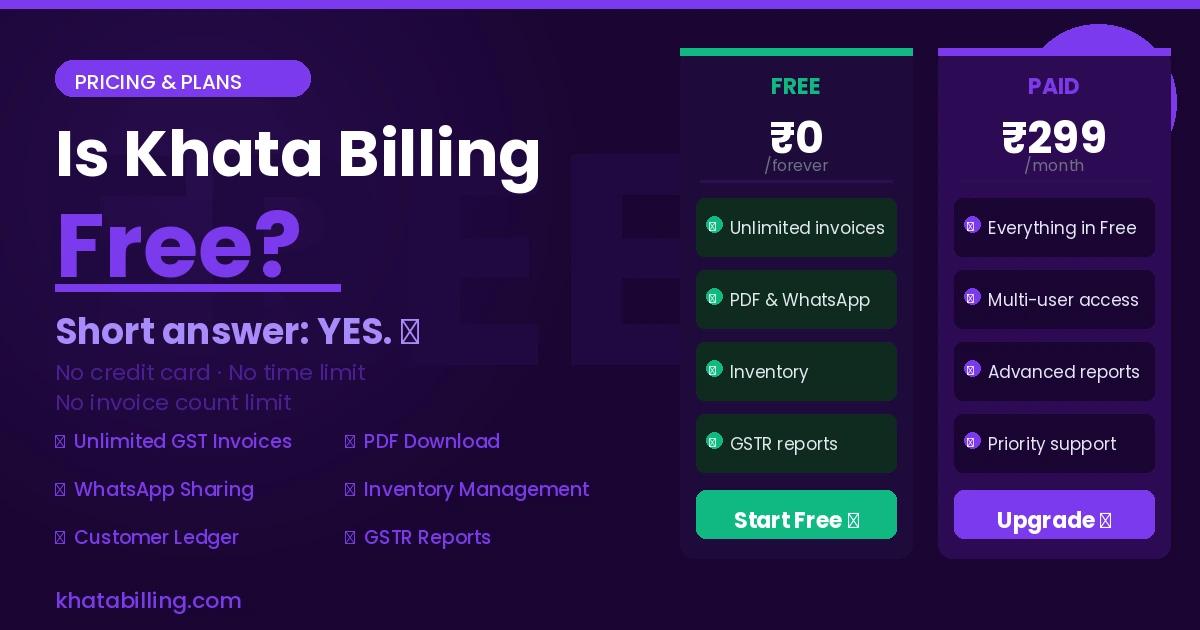
Khata Billing's free plan covers 10 invoices a day, up to 100 in any 30-day period, which suits seasonal retailers who need flexibility without upfront cost, and includes basic invoice themes, barcode generation, and a custom dashboard with four widgets for sales summary and party balances. For high-volume sellers, the Premium plan at ₹1,499/year (or ₹999/year with code SAVE500) removes all invoice limits, adds watermark-free and fully customizable invoices, supports up to 20 billing screens, and provides advanced GST reports like GSTR-1 and Profit & Loss that are essential for compliance and input tax credit claims.
Real-world use shows that when a retailer scans a product barcode at the billing counter, Khata Billing auto-fills the HSN code, applies the correct CGST and SGST rates, and prints a GST-compliant invoice with the shop's GSTIN, reducing filing errors and saving time during monthly GSTR-1 submission. This seamless integration of POS and GST compliance makes Khata Billing an indispensable tool for daily sales efficiency and regulatory adherence.
See more about Khata Billing — free GST billing software.
Understanding Khata Billing Free Plan Limits for GST Invoice Management
Khata Billing's free plan sets clear limits for GST invoice management that small business owners must evaluate against their daily volume. The system allows exactly 10 invoices per day and caps total invoices at 100 across any rolling 30-day period, making it ideal for low-volume shops or service providers. Invoices use basic themes with standard layouts and standard barcode generation for items, while supporting a single bank account and one cash account configuration. For example, a local grocery store issuing 8 invoices daily with items like 2kg Rice at ₹40/kg (12% GST) and 1kg Pulses at ₹60/kg (5% GST) would generate invoices totaling ₹152 each, consuming 8 of the 10 daily allowance. This pattern fits comfortably within the 100-invoice monthly cap, but a high-turnover general store handling 15+ daily invoices would exceed limits before month-end. Understanding these boundaries helps owners decide if the free tier meets immediate needs. The Khata Billing blog offers deeper insights into managing these constraints effectively.
See more about Khata Billing blog.
How to Set Up Your First POS Screen with Khata Billing's Intuitive Dashboard
Khata Billing makes setting up your first POS screen simple, even for shopkeepers with no IT background. Follow these steps to configure your counter operations:
- Log into your Khata Billing account on the web or mobile app and navigate to the Point of Sale section from the main dashboard; this is where you configure billing screens for your shop counter.
- Connect your primary device like a tablet or desktop by selecting Add New Device and scanning its QR code with your phone camera, which instantly links it to your Khata Billing account without complex setup.
- For a second billing screen, enable the option for a dedicated cash counter device by going to Manage Devices and activating up to two billing screens as allowed in your plan for efficient customer flow during peak hours.
- Customize your POS interface by choosing from GST-ready invoice themes and enabling barcode scanning for items, which speeds up checkout and ensures accurate GST-compliant invoicing for every transaction.
- Integrate your Inventory & stock management by linking your product catalog so that stock levels update automatically when items are sold through either POS screen.
- Test the setup by processing a sample sale with GST details, confirming that CGST, SGST, or IGST components calculate correctly and that the digital invoice prints with your shop's GSTIN clearly displayed for customer records.
Khata Billing POS Software Feature Comparison: Free vs Premium Plan Capabilities
Khata Billing's free plan covers 10 invoices a day, up to 100 in any 30-day period, creating immediate bottlenecks for busy shopkeepers and retailers scaling operations.
Here is how Premium plan capabilities directly address these growing business needs:
| Feature | Free Plan | Premium Plan |
|---|---|---|
| Invoicing limit | 10 per day, 100 per month | Unlimited invoicing with no daily or monthly caps |
| GST reporting | Basic sales and expense summaries only | Advanced GST reports including GSTR-1, Profit & Loss, and Party Ledger |
| Inventory management | Basic stock adjustment with 5-item import limit | Extended inventory tracking with 2000-item bulk import and assembled product support |
| POS billing screens | 2 billing screens | Up to 20 billing screens for larger retail or service counters |
| Custom fields | 1 printable field on invoices | 3 printable custom fields for detailed product or service information |
For example, a Delhi-based kirana store processing 150 daily transactions would hit the free plan's 100-invoice monthly ceiling within ten days, forcing manual workarounds that slow checkout speed and risk GST compliance errors; Premium's unlimited invoicing eliminates this constraint while the Free GST invoice generator enables rapid digital creation without delays.
See more about Free GST invoice generator.
Practical POS Workflow Example: Managing 15 Daily Invoices with Real Numbers
At a busy Delhi retail shop, the owner uses Khata Billing's free plan to manage 15 daily invoices by grouping transactions into batches of 10 invoices each, ensuring the 10-invoice daily limit is respected while staying under the 100-invoice monthly cap.
- During the morning rush (9 AM to 11 AM), the staff issues 10 printed invoices for items like biscuits (₹20 each) and tea (₹5 each), with GST at 18% (₹3.60 per biscuit, ₹0.90 per tea). Each invoice is generated via barcode scanning of pre-printed item barcodes, eliminating manual entry errors and saving time.
- At 1 PM, the owner processes a second batch of 5 invoices for larger items (₹200 each) with 5% GST (₹10), again using barcode scanning for quick item selection, keeping the daily total at exactly 10 invoices to avoid exceeding the free plan limit.
- All transactions sync in real-time to the mobile app; sales totals of ₹200 (10 biscuits) + ₹25 (5 teas) = ₹225 for the first batch, and ₹1000 (5 items) + ₹25 (GST) = ₹1025 for the second, with tax amounts clearly shown on each printed invoice.
- The custom dashboard updates the sales summary widget every 5 minutes, showing cumulative daily sales of ₹1250, which remains within the 100-invoice monthly allowance when combined with previous days' activity.
By scheduling batches and using barcode scanning, the retailer efficiently utilizes Khata Billing's free plan limits without risking penalties, while real-time tracking ensures accurate GST reporting preparation for the end of the month.
Step-by-Step Guide to Creating GST-Compliant Invoices with Barcode Integration
Khata Billing guides you through creating a GST-compliant invoice with barcode integration in three simple steps. First, log in to your dashboard and click 'New Invoice' to open the template where you select the correct HSN code for each product – this ensures accurate tax calculation under CGST, SGST or IGST as per GST law. Second, add items by searching the product database or typing the name; Khata Billing automatically generates the required barcode for each item using the HSN code, and you can adjust quantity, rate and taxable status while the system calculates CGST, SGST or IGST in real time. Third, review the invoice summary showing total amount, tax breakdown and invoice number, then click 'Print' to generate a thermal receipt that includes the barcode, your GSTIN and the customer's details for seamless point-of-sale integration. For businesses using the free plan, remember the daily limit of 10 invoices and monthly cap of 100 invoices applies, so plan accordingly. Premium users enjoy unlimited invoicing with watermark-free and fully customizable thermal receipts. Always verify the HSN code matches the product category to avoid GST filing errors, and use the built-in stock adjustment feature to update inventory after each sale. This process ensures every invoice meets GST compliance while speeding up checkout at your billing counter.
Maximizing Business Growth with Khata Billing's POS and Inventory Synergy
Khata Billing's POS and inventory systems work together to give Indian small businesses real-time stock visibility across all sales channels, which directly improves business growth.
When a shopkeeper sells a product at the counter, the POS software instantly updates the inventory count. This real-time sync means the stock room always shows accurate levels, preventing overstocking or running out of items like biscuits or medicines. Accurate stock valuation helps calculate the correct cost of goods sold, which is essential for GST filings and determining the true profit margin.
Here is how the synergy creates tangible benefits:
- Real-time stock updates from POS sales feed directly into inventory management, so every sale reduces the count instantly. This prevents situations where a shopkeeper thinks 50 units are available, but only 30 remain after unrecorded sales.
- Accurate stock levels reduce wastage, especially for perishable goods. A grocery store can see that 20 kg of onions remain, avoiding unnecessary purchases that lead to spoilage.
- Reconciliation becomes seamless when GST returns are prepared. The system matches sales data with inventory movements, making it easier to verify input tax credit claims and avoid mismatches in GSTR-1 filings.
- Across multiple channels such as a physical shop and a local online store, inventory counts stay synchronized, eliminating the need for manual stock checks at the end of each day.
For example, if a retailer sells 5 units of a ₹200 item with 18% GST, the POS records the sale and immediately deducts the stock, updating the inventory value from ₹1,000 to ₹800. This instant adjustment supports accurate stock valuation and simplifies month-end stock reconciliation without extra effort. With Khata Billing, the automatic link between POS sales and inventory means MSMEs spend less time correcting errors and more time growing their business.
Khata Billing equips Indian small businesses with GST-compliant invoicing, barcode-based POS, and real-time stock tracking that streamlines daily operations from the billing counter to the stock room. The free plan handles up to 10 invoices daily and 100 monthly, while the Premium plan removes all limits and adds advanced reports, unlimited accounts, and staff management for growing enterprises.
Experience seamless billing and inventory control with no hidden costs; Start free with Khata Billing to see how GST-ready features simplify your business workflow.