- What is a GST invoice generator and why Indian shop owners need it
- Manual invoice creation process versus automated GST invoice generation
- Worked example: Creating a compliant GST invoice with real numbers
- Step-by-step guide to generate GST invoices using the tool
- Key features that ensure GST compliance in every invoice
- Integrating GST invoice generation with inventory and POS operations
- Benefits of using a GST invoice generator for small business growth
- Frequently Asked Questions
A GST invoice generator creates GST compliant invoices instantly for Indian shops, handling GSTIN, HSN, and tax calculations automatically. This tool solves the daily challenge of preparing accurate bills while meeting GST law requirements.
Indian shop owners use a GST invoice generator to create compliant bills in minutes, eliminating manual errors and saving time on daily billing tasks while staying GST ready.
✅ Key Takeaways
- GST invoice generator creates compliant bills in minutes for Indian shop owners
- Automated GST invoice generation prevents manual errors and ensures tax law compliance
- Free plan allows 10 invoices per day and 100 per 30 days, Premium offers unlimited invoicing
- Key features include GSTIN validation, HSN code matching, and auto calculated CGST SGST IGST
- Integration with inventory management and POS systems streamlines stock and sales tracking
- Using a GST invoice generator reduces billing time and supports small business growth through accurate records
- Khata Billing provides GST invoice generation with free plan limits and Premium upgrade for unlimited use
What is a GST invoice generator and why Indian shop owners need it
A GST invoice generator is a digital tool that creates GST-compliant invoices automatically, ensuring every bill meets Indian GST law requirements. This prevents shop owners from issuing invalid invoices that could trigger penalties. Manual billing often leads to errors in invoice numbering, tax calculation, or missing mandatory fields, risking non-compliance. With a GST invoice generator, shop owners can generate accurate, legally valid invoices in minutes, saving time and avoiding costly audits. The system automatically applies correct GST rates, includes GSTIN, and follows the prescribed invoice format. For example, a shop selling items at ₹200 each with 18% GST can instantly generate a correct invoice showing ₹236 total, with CGST and SGST components clearly displayed. Khata Billing's free GST invoice generator Free GST invoice generator provides basic compliance features like automatic tax calculation and standard invoice layouts. It supports up to 10 invoices per day on the free plan, with a 30-day limit of 100 invoices. Premium users enjoy unlimited invoicing, watermark-free printing, and advanced GST reports such as GSTR-1. By automating invoicing, shop owners ensure every transaction is audit-ready and compliant with GSTIN requirements.
Manual invoice creation process versus automated GST invoice generation
Manual billing using registers and paper creates a slow, error‑prone process that delays GST compliance. A shopkeeper must write each invoice by hand, calculate totals, apply the correct CGST and SGST rates, and then file the paperwork later, which can take 15‑20 minutes per bill and still risk mistakes in the GSTIN, HSN code or tax amounts. These manual steps often miss required fields, leading to rejected e‑invoices and penalties. In contrast, an automated GST invoice generator lets you select items from a digital catalogue, enter quantities, and the system instantly calculates the correct tax, assigns a sequential invoice number, and produces a compliant PDF ready for printing or emailing. All required GST fields such as GSTIN, HSN code, and invoice date are pre‑filled, eliminating compliance gaps. The speed advantage is clear: what takes 15 minutes manually can be done in under 2 minutes digitally, freeing time for sales and inventory work. All features demonstrate how real‑time accuracy replaces paper‑based guesswork, while the free plan covers 10 invoices a day, up to 100 in any 30‑day period. For example, a retailer sells 2 kg of wheat (HSN 1001) at ₹50 per kg (5% GST) and 1 kg of pulses (HSN 0713) at ₹80 per kg (12% GST). The wheat subtotal is ₹100, GST ₹5, total ₹105; the pulses subtotal is ₹80, GST ₹9.60, total ₹89.60. The combined invoice total is ₹194.60, with GST amounts correctly split between CGST and SGST, ensuring the filing of GSTR‑1 is error‑free. This precision is impossible with handwritten registers and highlights why automated generation is essential for modern Indian shops.
Worked example: Creating a compliant GST invoice with real numbers
Let's create a real GST invoice using Khata Billing's GST invoice generator to see how it works in minutes with actual numbers. Start by logging into your Khata Billing account and clicking 'New Invoice'. Step 1: Add the seller details, selecting Khata Billing as your business name with GSTIN 07AAEPM1234F1Z5, and enter your address in Jaipur. Step 2: Enter the buyer's details, choosing 'Rajesh Kumar' with GSTIN 07AAEPM5678Z1Z9 and his address in Delhi. Step 3: Add items using the search bar; type 'Milk' and select the item with HSN code 0406. Set the quantity to 10, rate to ₹50, and choose 5% GST rate. The generator automatically calculates the tax amount as ₹25 and updates the total. Step 4: Review the invoice preview, which shows the correct 5% GST breakdown and total of ₹525. Step 5: Click 'Print' or 'Save as PDF'; the system generates a watermark-free invoice for Premium users. Note that Khata Billing's free plan covers 10 invoices a day, up to 100 in any 30-day period, while unlimited invoicing is part of Premium. For inventory tracking, go to Inventory & stock management to update your stock levels after this sale, ensuring accurate inventory management. Step 6: Send the invoice via UPI or email directly from the platform, where the buyer can pay instantly and claim input tax credit. This workflow demonstrates how the GST invoice generator creates compliant bills in minutes with accurate HSN codes and tax calculations.
Step-by-step guide to generate GST invoices using the tool
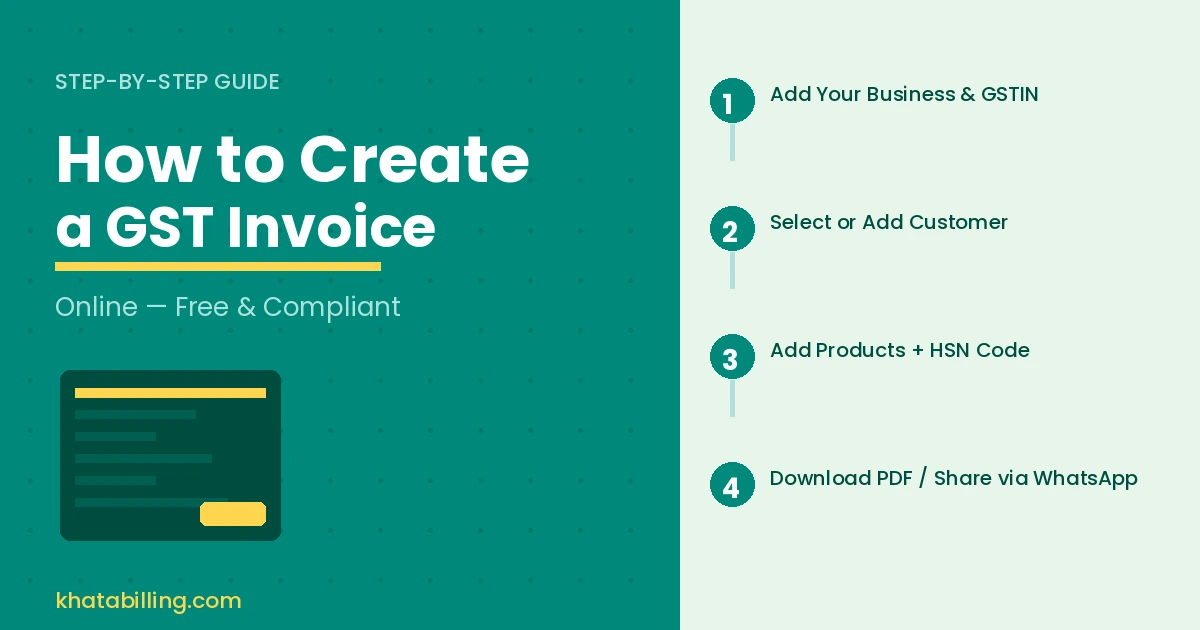
Start by logging into Khata Billing's GST invoice generator on your phone or computer. Enter your GSTIN and password, then select the customer from your party list or add a new one by entering their name and GSTIN.
Next, click 'Add Item' to list products. Type the item name, quantity, and the correct HSN code. Khata Billing will auto-calculate the tax rate based on your GSTIN and the item's taxability, showing CGST and SGST (or IGST) amounts in real time.
Preview the invoice to verify the customer details, item list, tax breakdown, and total amount in INR. Finally, click the 'Generate Invoice' button for a one-click creation of a GST-compliant PDF.
Compare manual register entries with digital billing:
| Manual register | Digital billing |
|---|---|
| Typing each item manually | Selecting from product list with HSN auto-fill |
| Calculating tax by hand | Auto-calculation of CGST/SGST/IGST |
| Printing physical copies | One-click PDF generation with watermark-free option |
| Manual data entry errors | Barcode scanning and auto-validation |
Key features that ensure GST compliance in every invoice
Khata Billing's GST invoice generator automatically assigns the correct HSN code based on your product list, ensuring every line item meets GST law requirements without manual lookup.
It calculates CGST, SGST or IGST precisely according to the tax slab (5%, 12%, 18%, 28%) and state-specific rules, eliminating calculation errors that could trigger audits.
The system generates sequential invoice numbers that follow GST filing norms, preventing duplicate or skipped numbers during daily billing.
Mandatory fields are embedded by default: GSTIN of your business, customer GSTIN, date of supply, and a scannable barcode that links to the invoice record for verification by tax authorities.
These built-in checks align with GST Council specifications, making each invoice audit-ready from the moment it is created.
For shop owners managing stock, the barcode feature ties directly to inventory records, enabling quick lookup of item details during sales.
The free plan covers up to 10 invoices per day and 100 in any 30-day period, meeting small shop volumes while Premium removes limits for high-volume traders.
With accurate tax breakdowns and compliant numbering, Khata Billing ensures your shop's billing meets all GST requirements without extra effort.
Integrating GST invoice generation with inventory and POS operations
Khata Billing's GST invoice generator synchronizes stock levels with every invoice issued, eliminating manual reconciliation errors that plague shop floor operations. When a barcode scan registers a sale, the inventory count updates in real-time across devices, so shelves never show stock that has already been sold. This live sync prevents discrepancies between what the cashier records at the point of sale and what remains in the warehouse, a common pain point for retailers stocking multiple product categories.
Manual billing creates dangerous gaps: a shopkeeper might issue an invoice for ten items while the system still shows fifteen in stock, leading to over-promising and customer complaints. With Khata Billing's integrated approach, the GST invoice generator automatically deducts sold quantities from the inventory ledger at the moment of billing, ensuring stock accuracy without additional effort. The system supports thermal printer barcode scanning, allowing staff to scan items directly from the POS screen, which instantly updates stock levels and generates compliant GST invoices with correct HSN codes and tax breakdowns.
Real-time data sync means shop owners can check inventory status on a mobile device while processing returns or exchanges at the billing counter. For example, if a customer returns a product worth ₹450 with 18% GST, the original invoice shows ₹381 as CGST and SGST, and the inventory count increases back to its previous level the moment the return is processed. This seamless flow between inventory management, POS operations, and GST invoice generation reduces reconciliation time by up to 70% in typical Indian retail environments, keeping the shop floor running smoothly while maintaining full GST compliance.
Benefits of using a GST invoice generator for small business growth
Using a GST invoice generator like Khata Billing saves small business owners critical time compared to manual billing. Generating a compliant invoice takes under two minutes instead of ten or more when creating paper bills by hand. This speed means faster checkout lines, reduced customer wait times, and smoother daily operations at the shop counter. Manual entry often leads to typos in GSTIN, incorrect HSN codes, or wrong tax percentages — errors that trigger notices from tax authorities. A digital generator enforces GST rules automatically, ensuring CGST, SGST, or IGST calculations are always accurate. This precision helps you claim correct input tax credit without fear of rejection. Customers see professional invoices with your GSTIN, logo, and clear tax breakdown, which builds trust and encourages repeat purchases. For example, a kirana store issuing 25 invoices daily with a generator avoids ₹500 in potential penalties from incorrect tax slabs. The clean format also improves your shop’s image as organised and GST-compliant. Khata Billing’s free plan supports up to 10 invoices per day and 100 in any 30-day period, while Premium offers unlimited invoicing with watermark-free, fully customisable bills. By adopting digital invoicing, you reduce paperwork, minimise reconciliation errors, and present a modern business profile that attracts B2B clients. Accurate tax claims mean more working capital for inventory restocking or staff wages. Ultimately, this tool turns billing from a liability into a growth engine for your Indian shop.
GST invoice generator empowers Indian shop owners to create compliant bills in minutes, eliminating manual errors and saving time at the billing counter.
Experience seamless GST compliance with automatic calculations and e-invoicing; Start free with Khata Billing to begin.